CMS

Introduction
Content Management Systems (CMSs) now power almost all websites. By 2025, they do far more than simply let people create and publish pages. They shape how sites are built, how easy they are to use, and how well content surfaces in search engines and AI-powered tools. As sites grow larger, more active, and more personalized, a CMS can be the difference between a site that feels fast, intuitive, and reliable, and one that feels slow and frustrating. This chapter examines the CMS landscape using data from the HTTP Archive.
We look at how many sites use CMSs, how top sites differ from the wider web, how CMS-powered sites perform, and which new capabilities are emerging as these platforms run at scale. Rather than just comparing CMS feature lists, this chapter focuses on how CMS defaults, hosting models, and build approaches shape the real experience of the web—for users and search engines—across both the top million and the top ten thousand sites.
The data shows that CMSs are now used by the majority of sites, and that sites without them are declining every year. To understand the trade-offs this creates for speed, usability, and discoverability, the chapter first explores overall CMS adoption, then examines what that means for performance and user experience, and finally looks at the new tools and patterns emerging alongside widespread CMS use.
What is a CMS?
A Content Management System is software that allows people to create and update content on the web without editing code for every change. Most CMSs separate content from presentation, so editors can change text, images, and structure without writing HTML, CSS, or JavaScript. Developers can extend a CMS by building themes, plugins, or modules.
Broadly, there are two main types of CMSs. A classic monolithic CMS combines content storage, presentation, and delivery into a single system.
A headless or composable CMS separates content management from the site or app that displays it. In practice, most CMSs share a common set of tasks: modeling content, editing it, managing media, extending functionality, and integrating with other systems. The differences in how they approach these tasks become clearer when we look at adoption and implementation patterns across the web.
CMS adoption
By 2025, CMS adoption reflects a web that’s both mature and increasingly specialized. Almost every site now runs on some kind of CMS, but how these platforms are used varies a lot by region, traffic level, and underlying technology. Instead of everyone standardizing on a single go-to system, the market is clearly fragmenting, with different platforms leading in different parts of the world, for different use cases, and at different scales.
Overall adoption

Overall adoption HTTP Archive measurements show that CMS-driven sites account for over 54% of observed websites in 2025, reinforcing CMSs as the default infrastructure for the web.
Adoption by geography
CMS adoption looks different from one region to another.
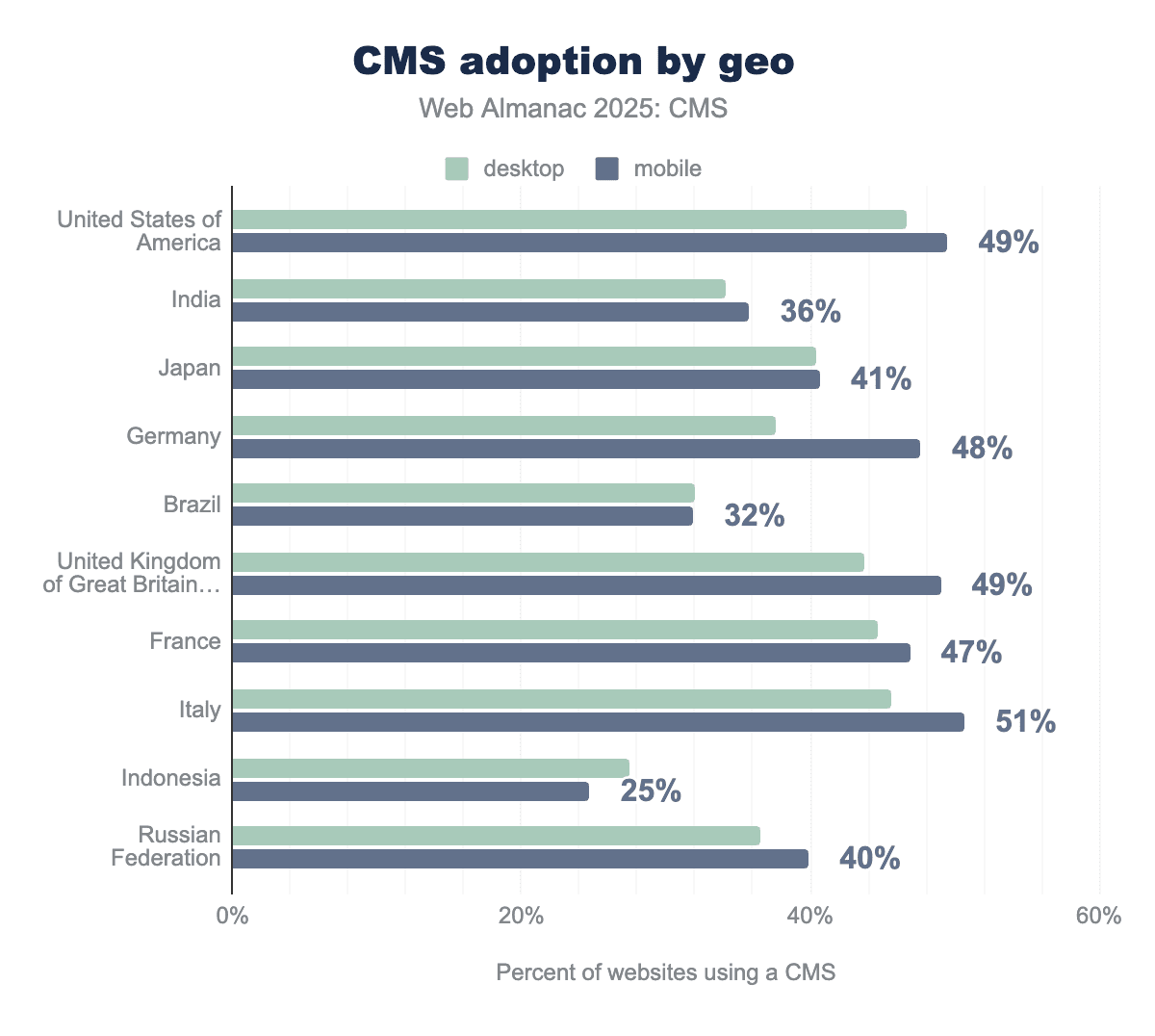
HTTP Archive data shows higher concentrations of hosted CMS platforms in North America and Western Europe. In contrast, open-source systems hold a relatively stronger position in parts of Asia and Eastern Europe.
Adoption by rank
Website rank continues to shape CMS adoption patterns. High-traffic sites tend to choose platforms that support complex workflows, deep customization, and long-term scalability. Lower-traffic sites are more likely to use hosted or all-in-one solutions that reduce operational overhead.
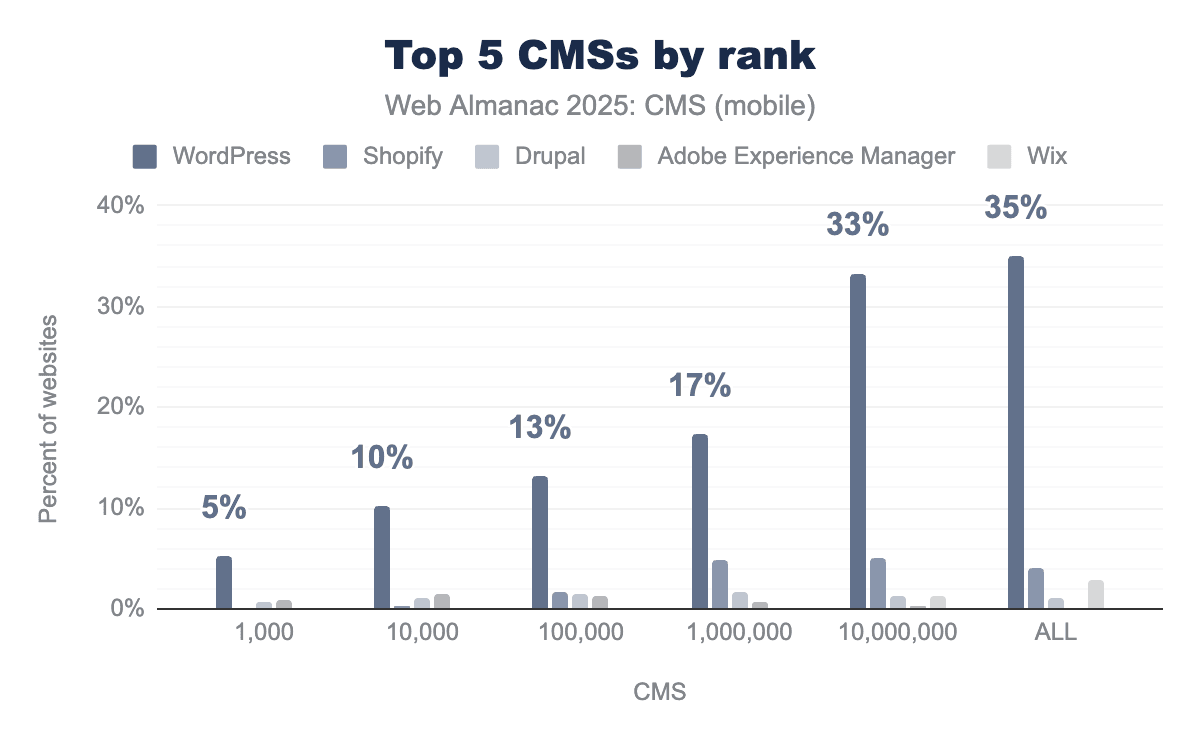
Among the top 10,000 websites, WordPress accounts for roughly 58% of CMS usage, while Drupal represents about 6–7%, far higher than its 1% overall market share. Platforms like Wix and Shopify are almost absent at this traffic level.
Most popular CMSs
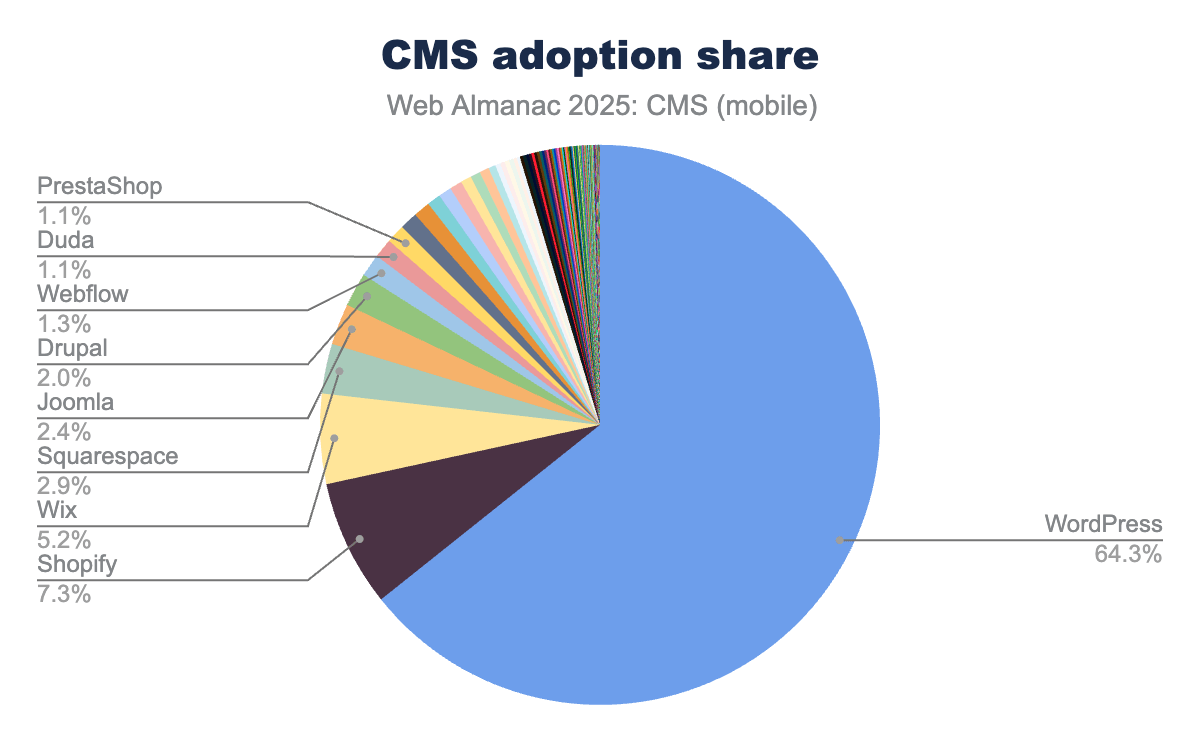
WordPress remains the dominant CMS in 2025, powering roughly 64% of CMS-driven sites. Its growth, however, has slowed to under one percentage point year over year, which points more to market saturation than to a major competitive threat from any single rival.
The data shows that this slowdown is not caused by one platform displacing WordPress. Instead, small gains are spread across several CMSs. Shopify has grown to around 7.3–7.8% CMS share, Wix to about 5%, and Squarespace to roughly 3%. No single platform’s growth is large enough to offset WordPress’s slowing expansion, suggesting a more fragmented ecosystem rather than a consolidating one.
Overall, the data indicates a more diverse CMS landscape shaped by market maturity and greater choice. WordPress remains broadly adopted, but new growth is increasingly distributed across multiple platforms instead of accruing to a single default CMS.
Fastest growing CMSs
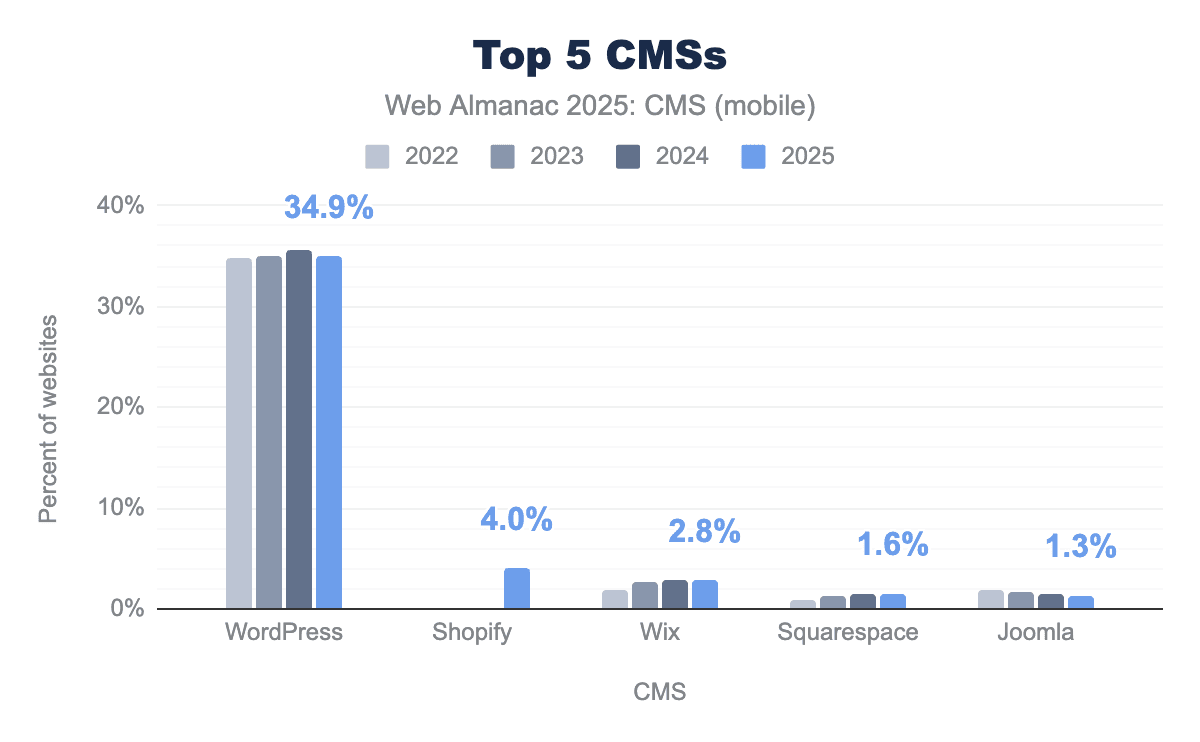
Year-over-year growth among CMS platforms in 2025 is modest and uneven. Shopify is a new entry this year having previously just been classified as under the Ecommerce category but now is included under CMS as well. Squarespace shows small but positive growth of roughly 0.2–0.3 points, reaching around 3.0–3.3%. Wix’s growth slows sharply compared with prior years and is now effectively flat at about 5.2% after a period of rapid expansion. These gains are incremental and spread out, not indicative of a new wave of explosive growth.
By contrast, WordPress’s share declines slightly year over year—by less than one percentage point—from its 2024 peak, marking its first sustained slowdown after decades of expansion. Even so, WordPress still powers most CMS-driven sites and remains the clear leader across the web. Traditional open-source platforms like Joomla and Drupal continue long-term declines in overall share, though Drupal is still disproportionately represented among high-traffic sites. In short, the fastest-growing CMSs in 2025 are making gains in specific niches, while WordPress remains dominant in absolute terms and continues to anchor the broader ecosystem.
WordPress in 2025
Given its dominance in the CMS world, it’s worthwhile discussing it a bit more.
Market and ecosystem
WordPress’s importance in the CMS ecosystem is now less about raw growth and more about influence. Its sheer scale makes it the reference point for understanding architectural choices, performance patterns, and real-world implementation trade-offs. Because WordPress is used across almost every traffic tier and use case, its behavior in production has an outsized impact on overall web performance and CMS-driven outcomes.
That influence is supported by a highly extensible ecosystem. Rather than enforcing a single development or hosting model, WordPress supports many approaches through its plugin, theme, and integration layers. This flexibility lets sites evolve gradually—adding new features, monetization models, or editorial complexity—without migrating platforms. As a result, WordPress often stays in place across multiple generations of a site’s lifecycle, even as other platforms grow in narrower segments.
The same openness, however, introduces significant variability. WordPress sites show a wide range of architectures, performance profiles, and operational complexity compared with more tightly integrated CMSs. Its dominance does not lead to uniform outcomes; instead, it produces a broad distribution shaped by implementation choices. The next sections examine how this flexibility appears in practice, in terms of architecture, performance metrics, and constraints at scale.
Technical performance and improvements
Recent WordPress development has focused on reducing performance bottlenecks that appear as sites grow in size, editorial complexity, and block usage. Rather than redefining interaction models, core engineering work emphasizes making existing systems faster, more cache-friendly, and less sensitive to configuration differences.
A major area of progress has been editor performance. Optimizations to template loading, block rendering, and pattern reuse have reduced editor startup and interaction lag, delivering up to 35% faster template loading in block-heavy setups. Persistent caching of reusable block patterns and global styles cuts down on repeated computation, addressing long-standing scalability issues for large sites with complex layouts.
Media handling has also improved. Updates to image processing pipelines result in roughly 20% faster AVIF image generation, better auto-sizing, and more reliable lazy loading. These changes reduce server-side processing time and frontend layout shifts, improving load performance without requiring individual site-level tuning.
On the frontend, performance work has centered on cutting unnecessary payloads and redundant processing. Core now loads block styles and scripts more selectively, avoids assets for hidden blocks, and caches generated styles more aggressively. Speculative loading techniques—such as prefetching and prerendering likely navigations—further improve perceived speed and Largest Contentful Paint in supported browsers. Collectively, these optimizations target common real-world bottlenecks, improving consistency across a wide variety of configurations. HTTP Archive data supports this pattern, showing that WordPress performance variance is driven more by configuration than by core limitations.
Accessibility improvements run alongside performance work. Enhancements to semantic markup, keyboard navigation, labeling, and editor usability aim to make accessibility a baseline property of WordPress output, not something that depends entirely on theme or plugin choices.
WordPress progression in 2025
These changes suggest that WordPress is shifting from a focus on expansion to one on stabilization. The emphasis on editor responsiveness, cache reuse, asset reduction, and variance control aligns with HTTP Archive findings that show WordPress sites spanning a wide performance range rather than clustering at the top or bottom. Core changes are increasingly aimed at lifting the worst-performing implementations, narrowing the gap between well-tuned and poorly tuned sites.
Ongoing investment in block-based architecture and Full-Site Editing (FSE) looks less like experimentation and more like long-term commitment. Rather than stepping back from the block model, WordPress is absorbing its operational costs through steady optimization. Blocks are now treated as core infrastructure, with performance work focused on making them viable for large, long-lived sites.
Equally important is what WordPress core does not try to do. Despite widespread experimentation with AI, collaboration tools, and advanced workflows in the broader ecosystem, core continues to prioritize APIs, primitives, and backward compatibility over bundled, opinionated end-user features. This follows WordPress’s historical pattern: let innovation happen at the ecosystem edge while keeping core conservative and predictable.
In a CMS market that is becoming more polarized, these choices reinforce WordPress’s position as durable web infrastructure. While other platforms differentiate themselves through tightly managed, vertically integrated experiences, WordPress continues to favor adaptability, longevity, and risk reduction at scale. Its technical trajectory in 2025 is less about chasing competitors feature-for-feature and more about remaining operable across the broadest and most diverse slice of the web.
Page builders
Page builders have become a dominant interface layer within the WordPress ecosystem. Estimates suggest that around 60% of WordPress sites use a page builder, reflecting demand for faster iteration, less reliance on developers, and greater editorial autonomy. Elementor has the largest observed footprint, followed by WPBakery and Divi, alongside broad use of the native Block Editor.
Page builders appeal because they speed up workflows. WYSIWYG editing, reusable components, and template libraries allow non-technical users to adjust layouts without writing code, aligning with broader no-code and component-based development trends. For many organizations, this shrinks bottlenecks and shortens iteration cycles.
These advantages come with trade-offs. Page builders often generate more complex DOM structures and larger CSS and JavaScript bundles, raising performance risks at scale. Older builders, in particular, have created long-term maintenance and lock-in issues. As performance expectations rise, these costs are increasingly visible.
In response, major builders are moving closer to WordPress core conventions. Newer efforts prioritize block-native output, reduced reliance on shortcodes, and deeper integration with the Block Editor and FSE. Rather than trying to replace core, many builders are converging around shared primitives and competing mainly at the UX layer.
Page builders change how WordPress pages are put together and rendered, with clear consequences for performance. By abstracting layout and design into visual components, they reduce the need for custom code and speed up site creation. But this extra abstraction also affects DOM complexity, asset-loading behavior, and runtime execution, making page builders a major contributor to performance variation across WordPress sites.
Historically, many page builders were associated with heavy markup and large CSS and JavaScript payloads, which often led to slower loads and weaker Core Web Vitals. More recent builders have tried to improve this by adding conditional asset loading, minification, and reduced shortcode use. These efforts help, but they do not completely erase the performance gap between builder-heavy sites and more tightly controlled builds.
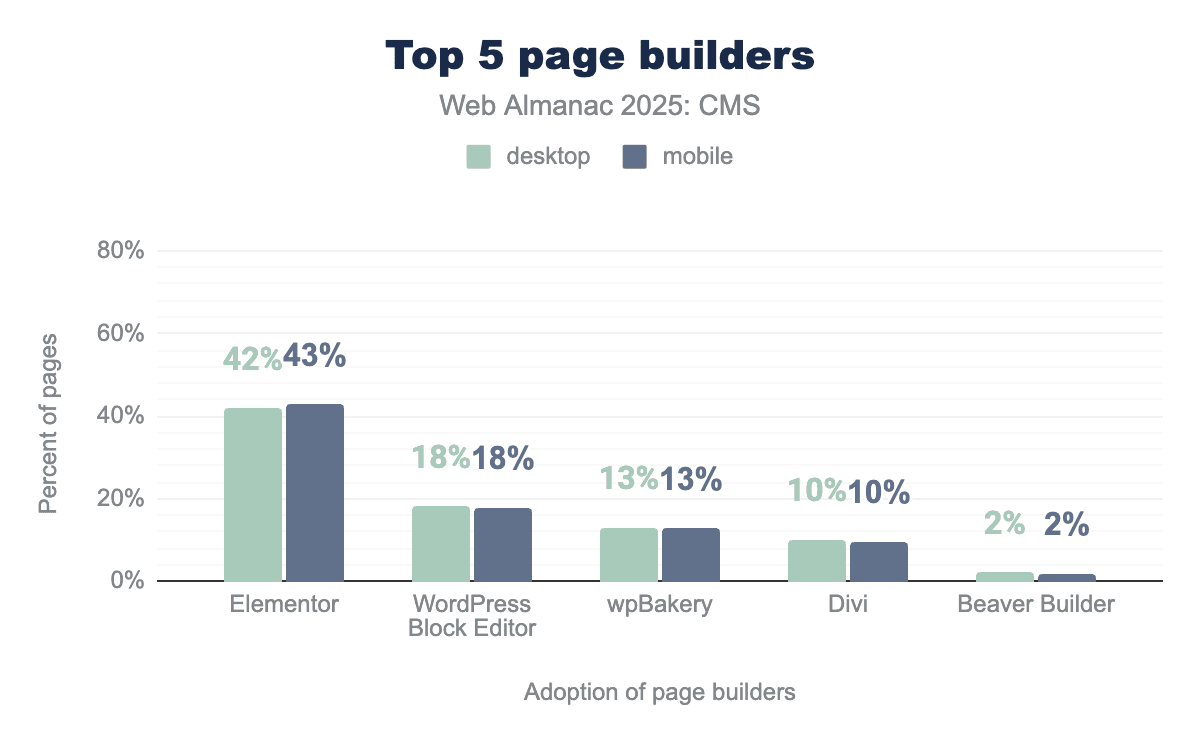
Usage patterns are also shifting. Between 2024 and 2025, Elementor remained the most widely used page builder, but its share dropped from about 56% to 43%, pointing to a more fragmented ecosystem. The WordPress Block Editor grew to around 18%, while WPBakery fell from roughly 21% to 13%. Divi declined from about 14% to 10%, and Beaver Builder held a small but steady share of around 2%. These trends point to a gradual move away from older builders toward block-native or more performance-focused approaches.
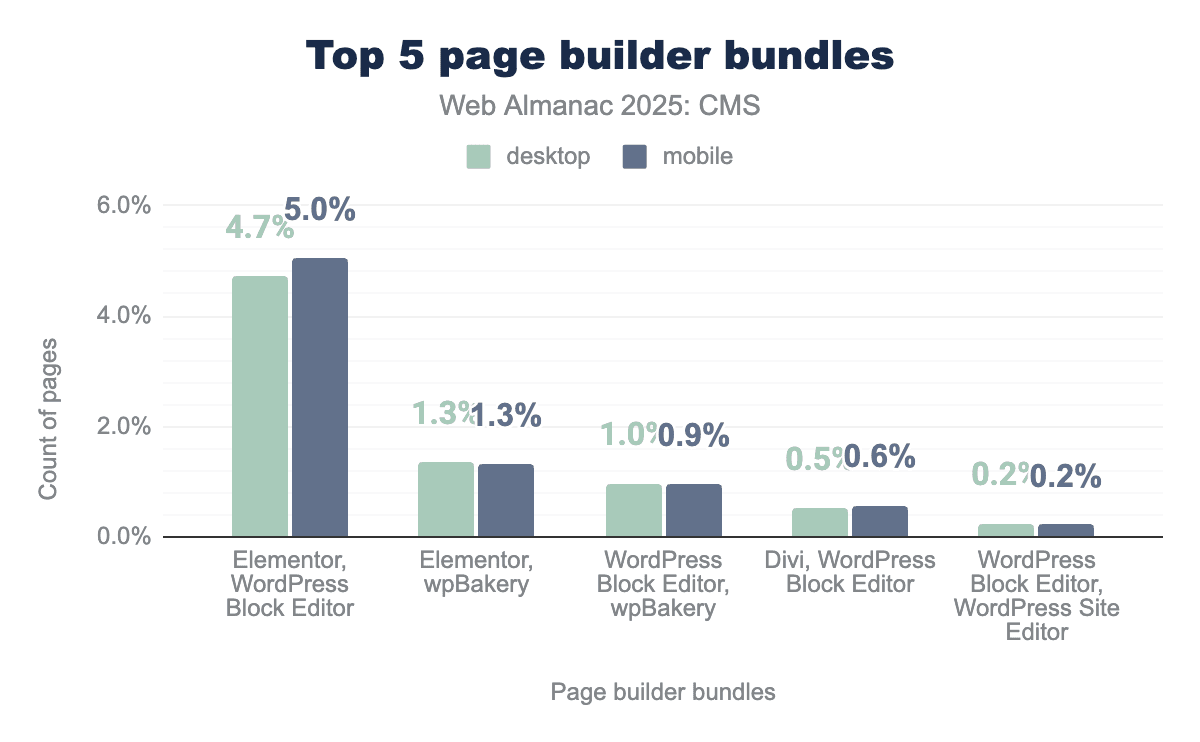
Overall, the data suggests that page builders are still a core part of the WordPress ecosystem, but their performance impact now depends heavily on how closely they align with WordPress core. Builders that reduce markup overhead, avoid global asset loading, and integrate deeply with the Block Editor tend to limit performance costs more effectively. As expectations continue to rise, the technical differences between builders may matter more than their visual feature sets.
CMS user experience
The architectural and performance trade-offs described so far are shaped not just by platform design, but by how CMSs are actually used. The user experience of CMSs—especially for editors and administrators—remains a critical but often underexplored driver of real-world outcomes.
Across platforms, editorial UX often emphasizes flexibility over structure, presenting users with many options but few guardrails. Effective CMS UX instead leans on structured components, sensible defaults, and role-based permissions to reduce cognitive load and support consistent publishing. As sites grow, additional needs—such as governance, approval workflows, taxonomy management, and localization—turn CMS UX from a design preference into an operational requirement.
Although invisible to most visitors, CMS UX directly affects frontend quality. Poorly constrained editorial tools can result in inconsistent layouts, heavy pages, accessibility problems, and outdated content. In this way, backend UX indirectly shapes performance, discoverability, and accessibility for end users.
One common response to these challenges has been the adoption of page builders, which aim to simplify layout and design through editor-friendly visual interfaces. Their impact echoes HTTP Archive findings that show wide performance variation for WordPress sites driven more by configuration and tooling choices than by core itself.
Core Web Vitals
Core Web Vitals offer a practical way to see how CMS platforms perform under real-world conditions. Rather than showing theoretical best-case performance, these metrics capture the combined effects of platform defaults, hosting choices, themes, plugins, and page builders as experienced by actual users.
This section looks at year-over-year Core Web Vitals performance across major CMS platforms, focusing on mobile, where constraints are tighter and differences are easier to see. The goal is not to crown a single “fastest” CMS, but to understand how varying levels of platform control and ecosystem complexity affect performance at scale.
Year-over-year trends
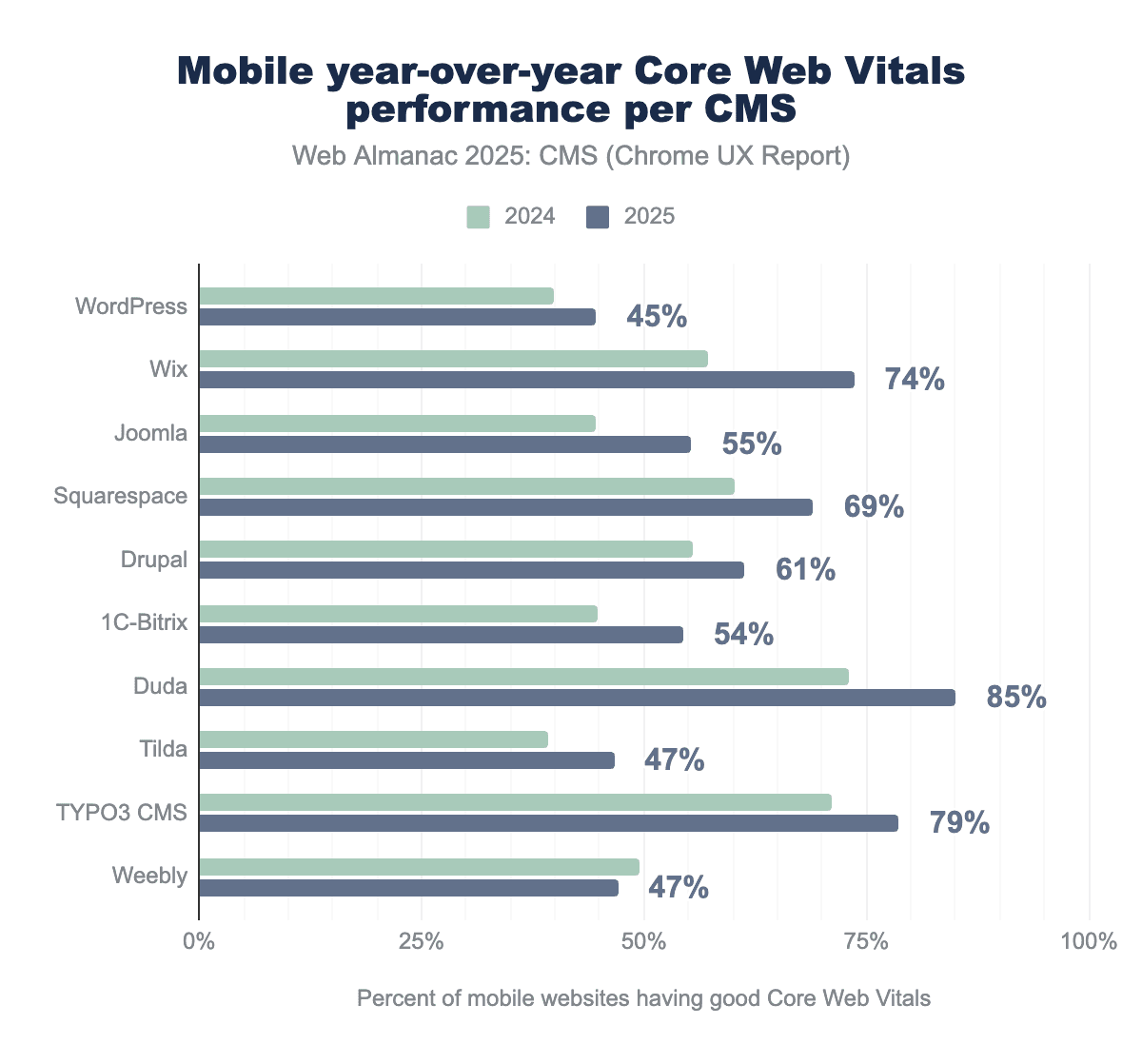
From 2024 to 2025, most CMS platforms improved their overall Core Web Vitals performance, though by varying amounts. Platforms with more tightly managed environments see the largest gains—led by Wix (around +14% year over year) and Duda (+11%), followed by Squarespace (+8%) and Joomla (+7%). Several smaller platforms, including 1C-Bitrix, Tilda, and TYPO3, improved by about 5%.
More extensible platforms improved less. WordPress and Drupal each gained around 4% year over year, while Weebly declined slightly (about -1%). These patterns highlight how difficult it is to propagate improvements evenly in ecosystems that allow more customization and diversity in implementation.
Largest Contentful Paint (LCP)
Largest Contentful Paint measures how quickly the main content of a page appears and is one of the most important metrics for perceived load speed.
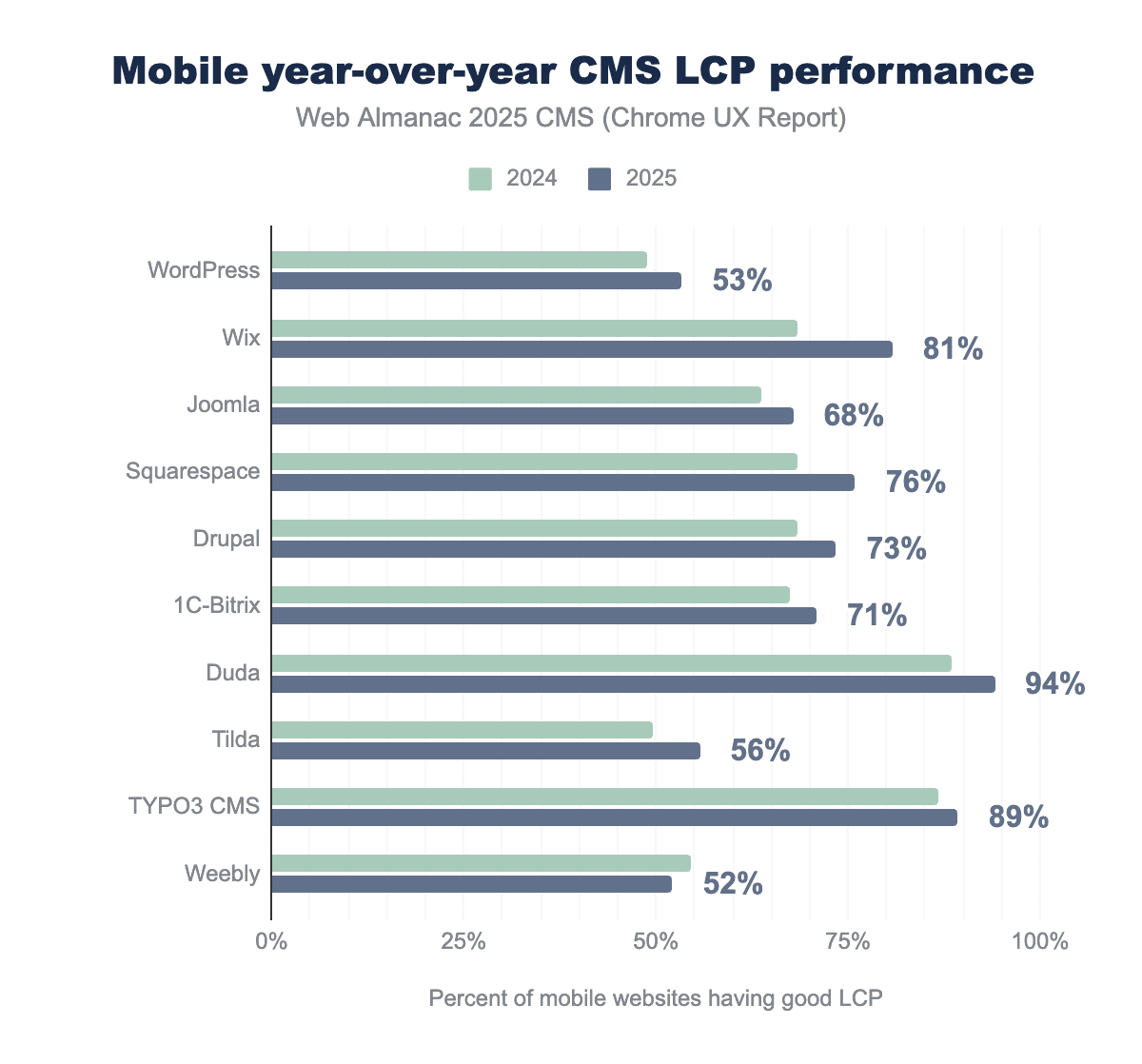
In 2025, 54% of sites achieved a “good” LCP score, reflecting ongoing progress but also significant remaining variability.
Most CMS platforms show year-over-year LCP improvements. Wix leads with roughly a 10% gain, followed by Squarespace (+7%) and Duda (+5%). WordPress, Joomla, and Drupal each improve by about 4%, while Weebly slips slightly (around -1%). These differences align with platform-level choices around asset loading, image optimization, and default configurations.
Cumulative Layout Shift (CLS)
Cumulative Layout Shift captures how visually stable a page is while it loads, by measuring unexpected layout movements.
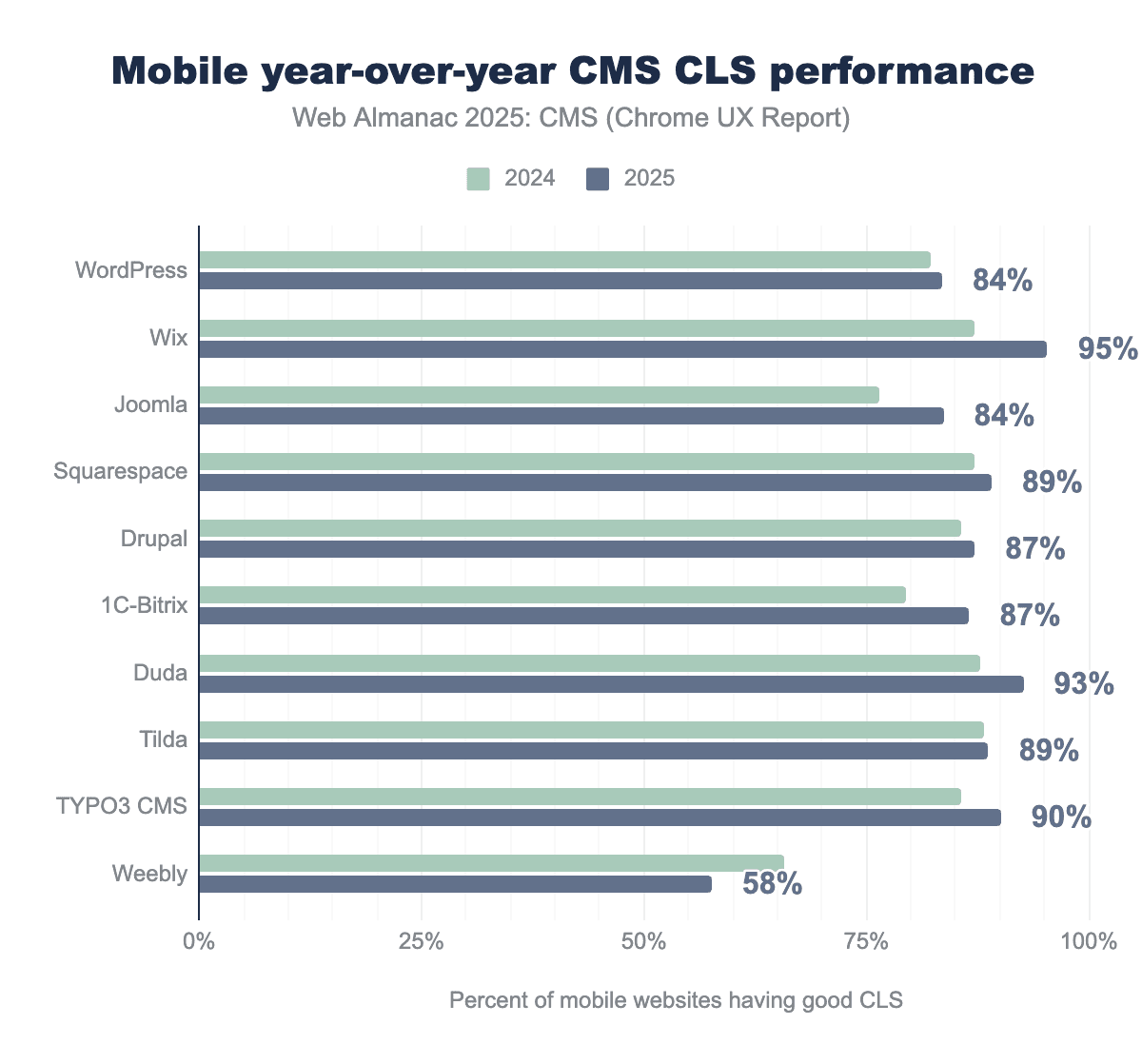
CLS remains one of the more uneven metrics across platforms, reflecting challenges in managing late-loading content, embeds, and dynamic layouts.
Wix again shows the strongest year-over-year improvement (around +8%), followed by Duda (~+4%), then Joomla and 1C-Bitrix (each around +3%). Other platforms show little change, while Weebly experiences a notable decline (about -8%). Overall, CLS outcomes seem to depend heavily on implementation discipline, not just platform choice.
Interaction to Next Paint (INP)
Interaction to Next Paint measures how responsive a page feels across all user interactions, not just at initial load.
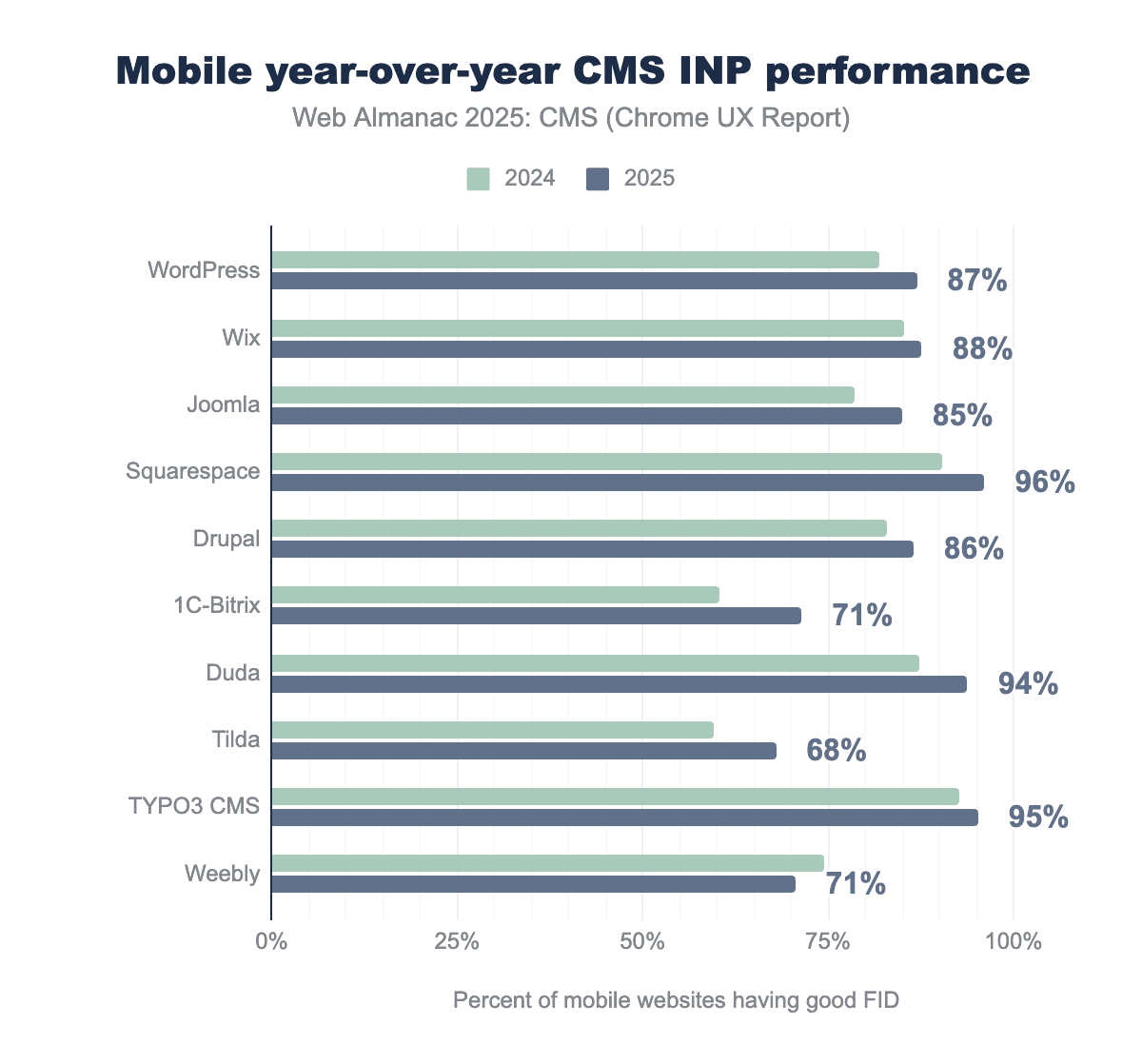
Compared with LCP and CLS, INP improvements are modest, underscoring how difficult it is to manage JavaScript, long tasks, and third-party scripts.
In 2025, 1C-Bitrix leads in INP improvement (about +10%), followed by Squarespace and Duda (around +6%), Joomla and Tilda (about +5%), and Drupal (+3%). Weebly again sees a decline (-3%). Across the board, no CMS consistently delivers excellent INP at scale, suggesting that interaction latency remains a shared problem.
Lighthouse quality metrics
Lighthouse offers a complementary, lab-based perspective on site quality across Performance, Accessibility, SEO, and Best Practices. While Lighthouse scores do not directly reflect real-user experience, they help compare typical implementations under consistent test conditions.
Performance
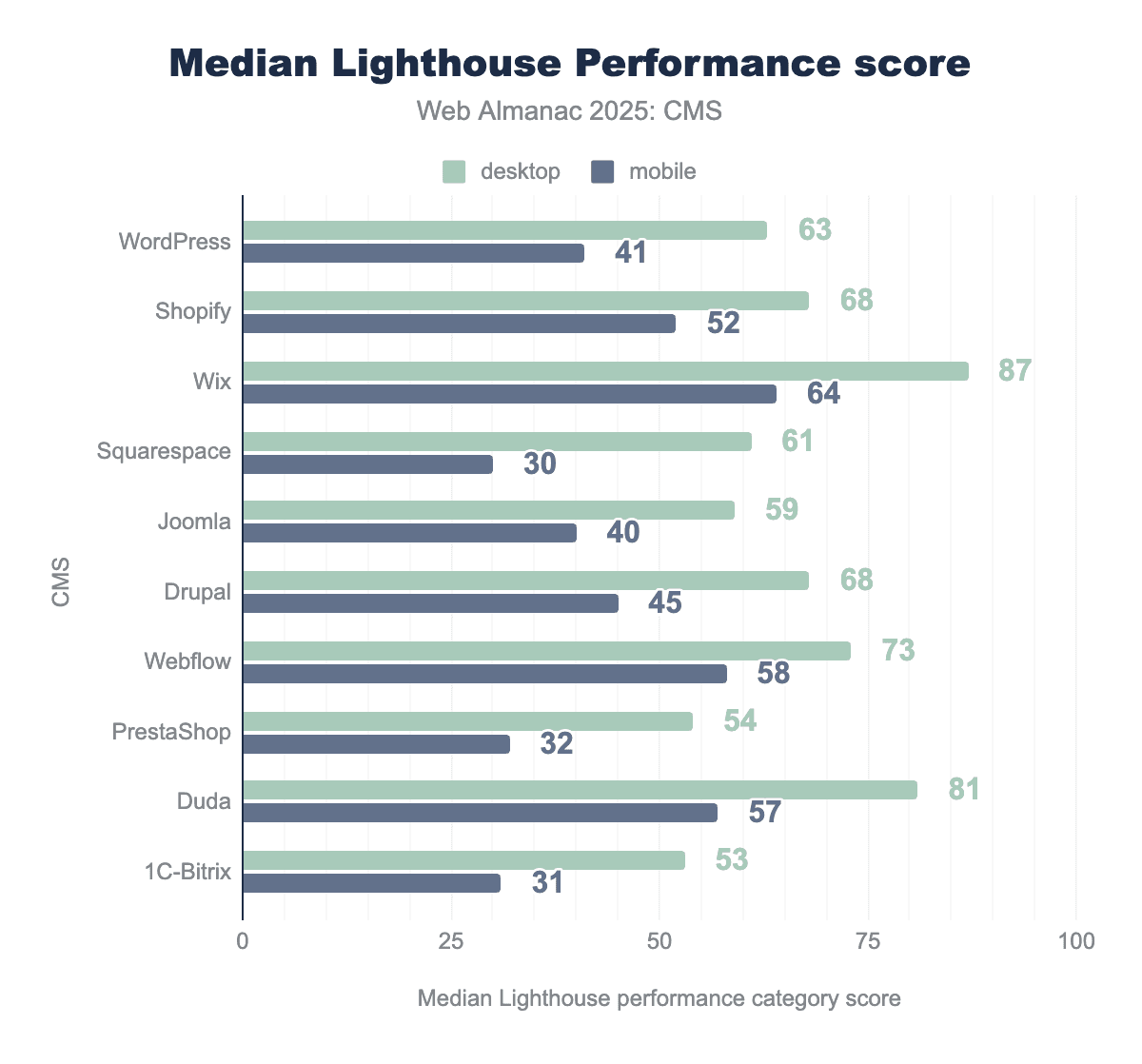
Median Lighthouse performance scores improved between 2024 and 2025 on both desktop and mobile, with desktop consistently scoring higher. On desktop, Wix (87) and Duda (81) are out in front, followed by Webflow (73). WordPress records a median score of 63, with several platforms close by.
On mobile, scores are lower across the board. Wix leads with 64, followed by Webflow (58), Duda (57), and Shopify (52). WordPress (41) and Joomla (40) sit behind this group, while PrestaShop and 1C-Bitrix post the lowest scores. Year over year, Wix shows the biggest jump on mobile (from 55 to 64), while most other platforms see only modest movement or remain stable. These lab scores are best read as context, not as a proxy for real-user experience.
SEO
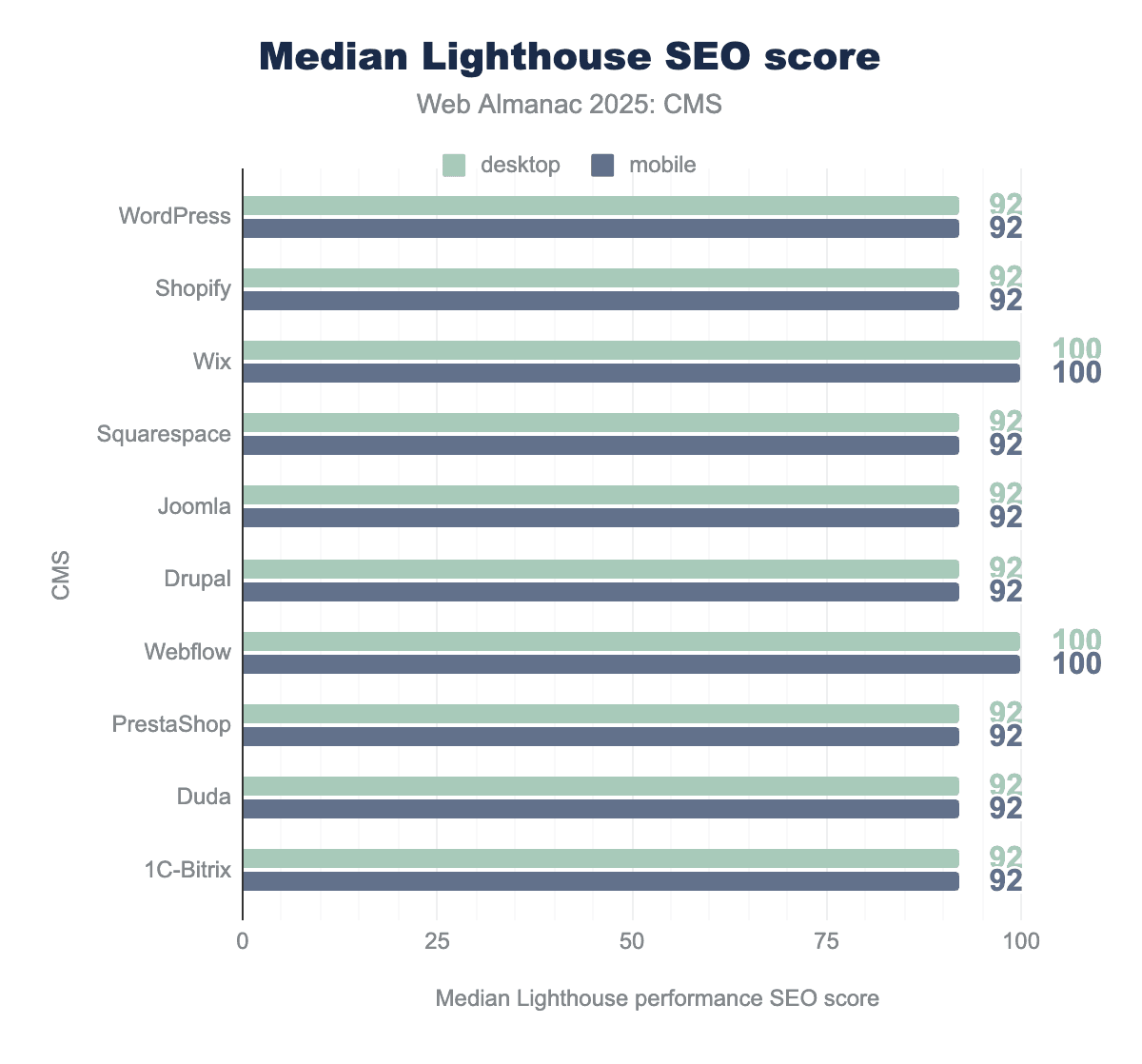
In 2025, Lighthouse SEO scores remain high across CMS platforms, with most clustered between 92 and 100 on both mobile and desktop. Webflow and Wix achieve perfect scores, while WordPress, Duda, and Joomla remain around 92. The small year-over-year changes suggest that basic SEO best practices are now widely baked into modern CMS platforms.
Accessibility
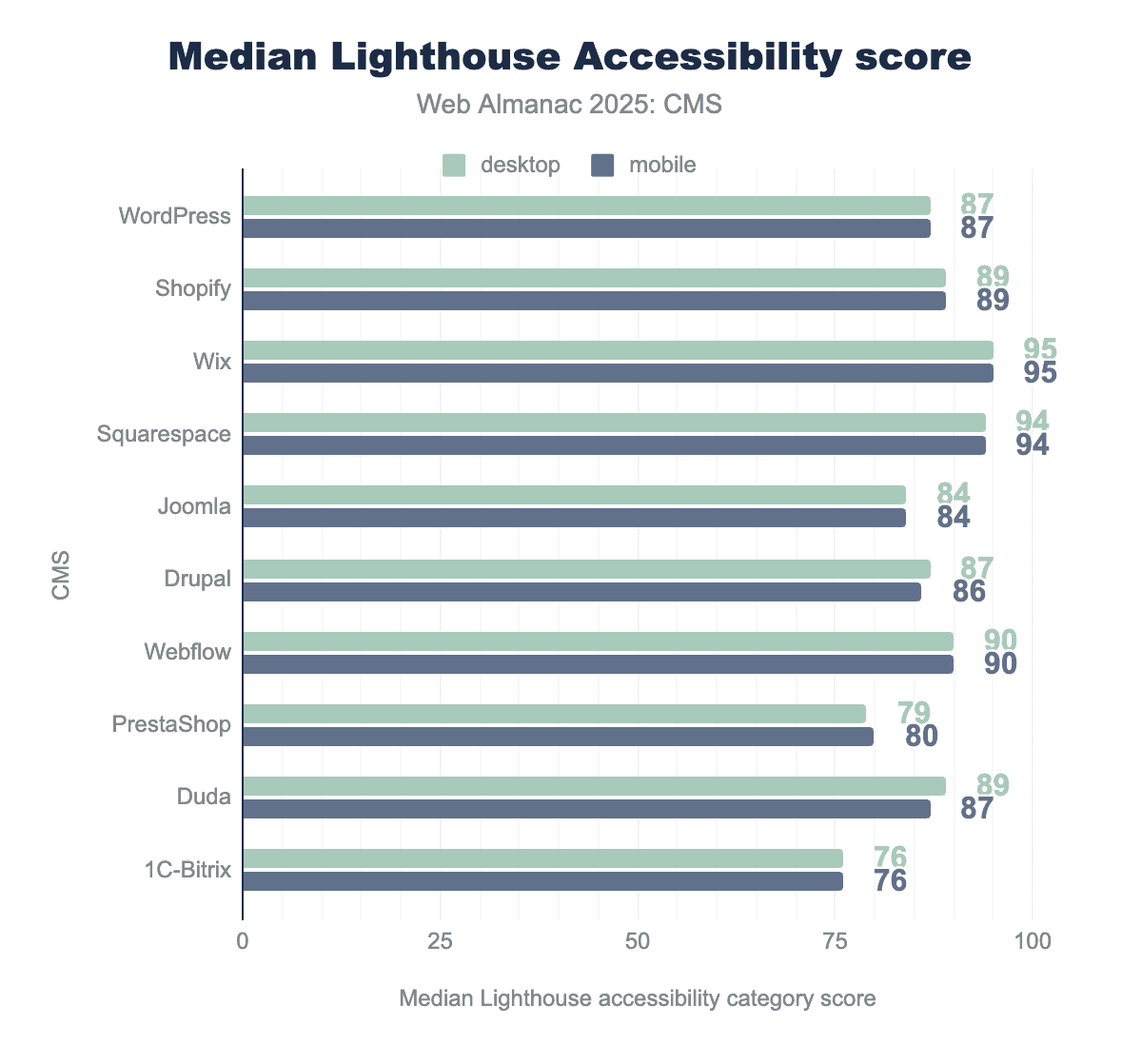
Accessibility scores vary more than SEO but still show limited change year to year. In 2025, median scores range from 76 to 95, with Wix (95) and Squarespace (94) leading. WordPress and Joomla remain stable, while 1C-Bitrix trails at 76. Overall, improvements are gradual, indicating steady but not transformative progress.
Best Practices
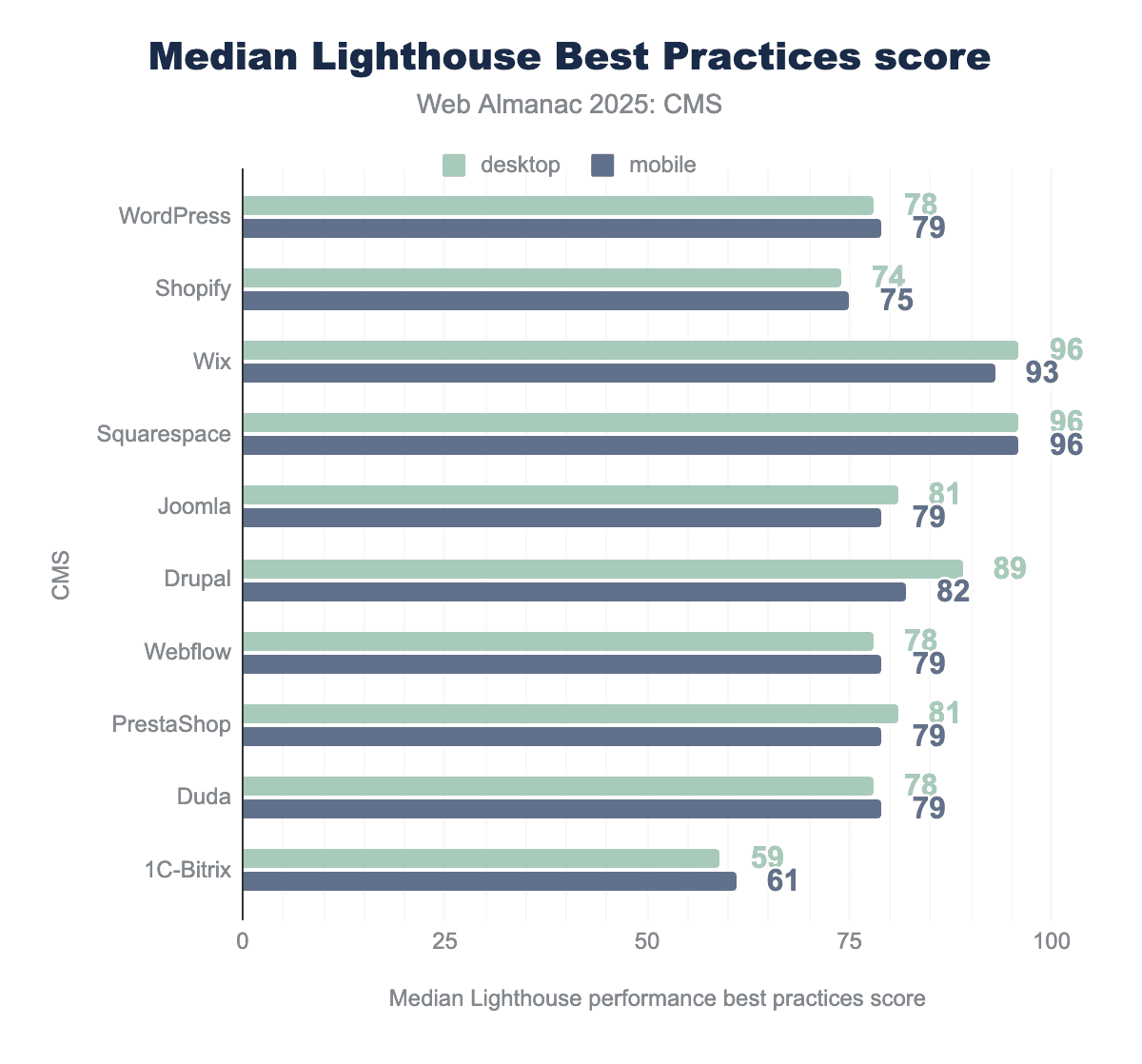
Best practices scores show clearer separation. On mobile, Squarespace (96) and Wix (93) lead, followed by Drupal and PrestaShop (both 82). WordPress, Duda, and Joomla cluster around 79, and 1C-Bitrix ranks lowest at 61. Desktop results follow a similar pattern.
Year-over-year, some platforms improve notably—particularly Wix (from 79 to 93) and Drupal (from 79 to 82)—while others barely move. These differences point to ongoing gaps in areas like modern API usage, security configuration, and error handling.
Page weight and resource composition
“Page weight” is the total size of all resources a browser needs to download to render a page. Over the past decade, page weight has steadily increased.
In 2025, the average page is roughly 2.67 MB on desktop and 2.28 MB on mobile. Both figures exceed the commonly recommended range of 1–1.5 MB, reflecting continued bloat across the web.
Most of this growth comes from images and JavaScript, while HTML remains a relatively small part of total transfer size. Despite growing awareness of performance issues, page weight keeps rising. Pages that take longer than three seconds to load tend to have much higher bounce rates, and additional delays are strongly linked to lower conversion rates. For mobile users on slow or metered connections, heavy pages can be a real barrier to access.
Page weight is therefore more than a technical detail. It shapes user perception, accessibility, and business outcomes. Organizations that treat page weight as a first-class constraint generally see more predictable performance, while those that do not often struggle with sluggish experiences and reduced engagement.
Total page weight by CMS
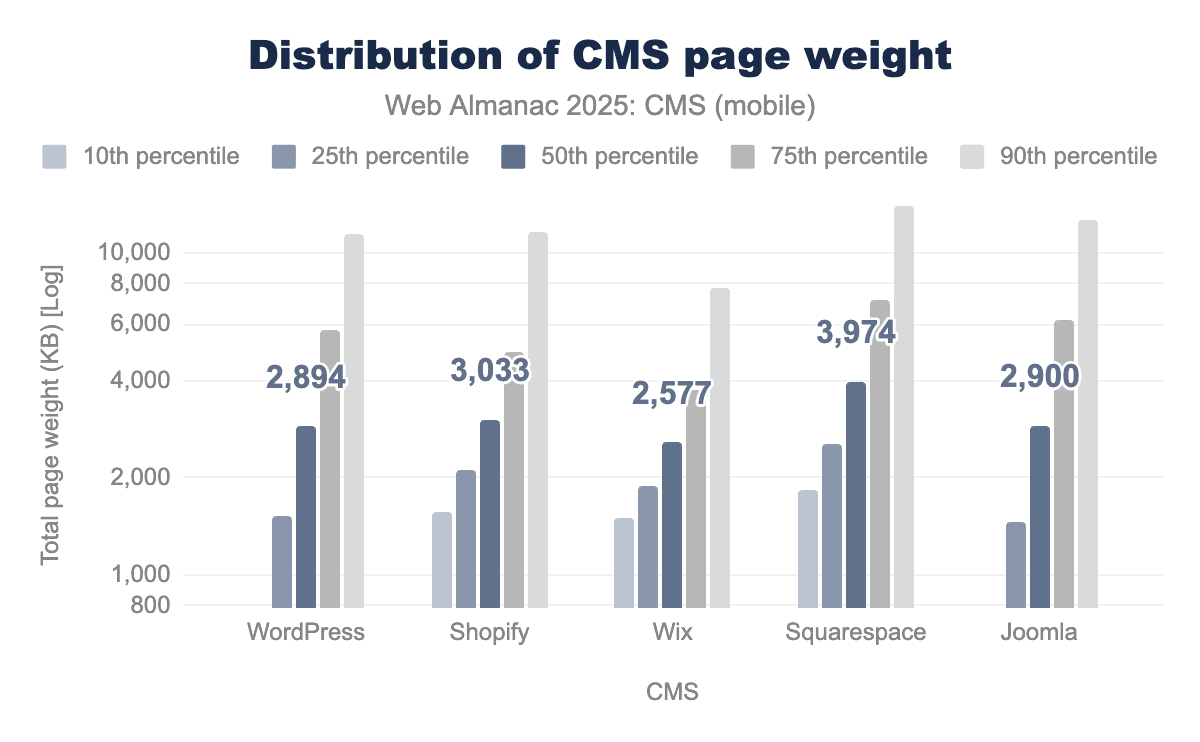
Total page weight varies widely between CMS platforms, influenced by default themes, asset pipelines, plugin ecosystems, and hosting models. While page weight has gone up across all platforms, CMS choice still affects both the median size and the spread of page weights.
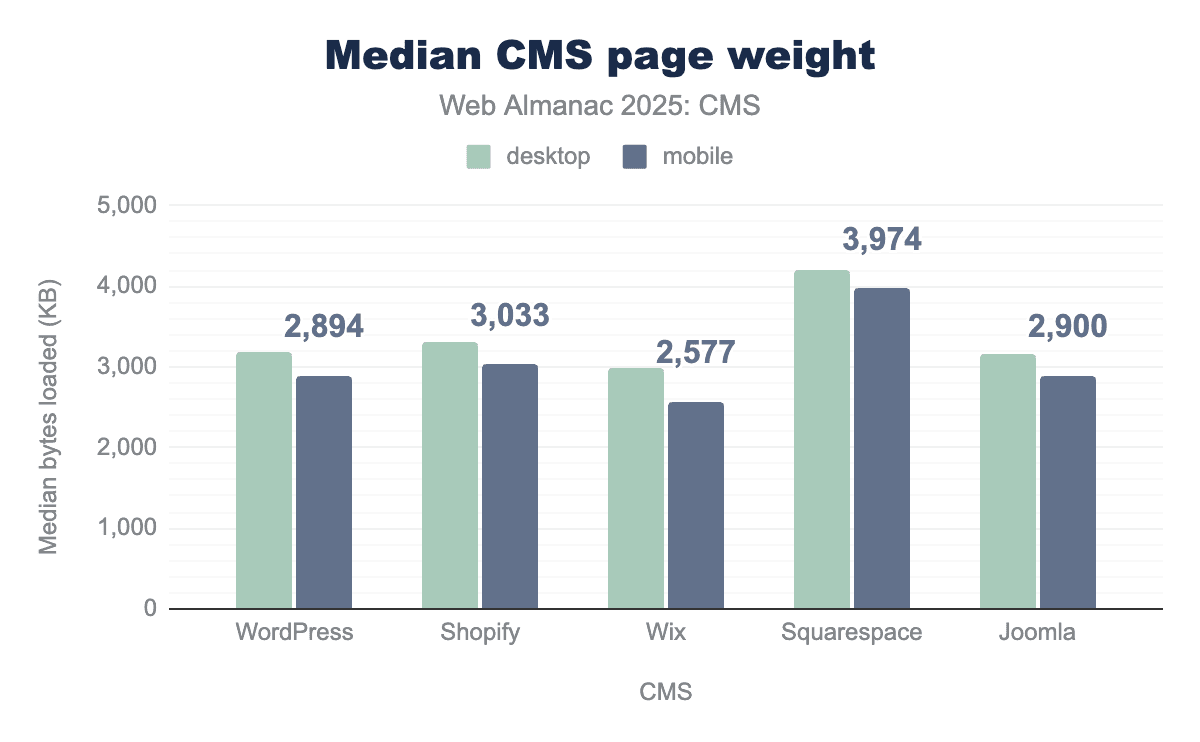
Platforms in more controlled environments tend to show tighter distributions. More extensible CMSs show wider variation, with page weight driven less by core and more by the accumulated impact of themes, plugins, page builders, and third-party tools. As a result, two sites on the same CMS can have very different total transfer sizes.
This variability mirrors the earlier performance patterns, reinforcing the link between page weight and broader performance outcomes.
Resource composition: images
Images remain the largest contributor to page weight on all CMS platforms. Even as modern formats and responsive image techniques become more common, their benefits are often offset by a growing number of images and larger visual assets—especially on template-heavy and visually rich sites.
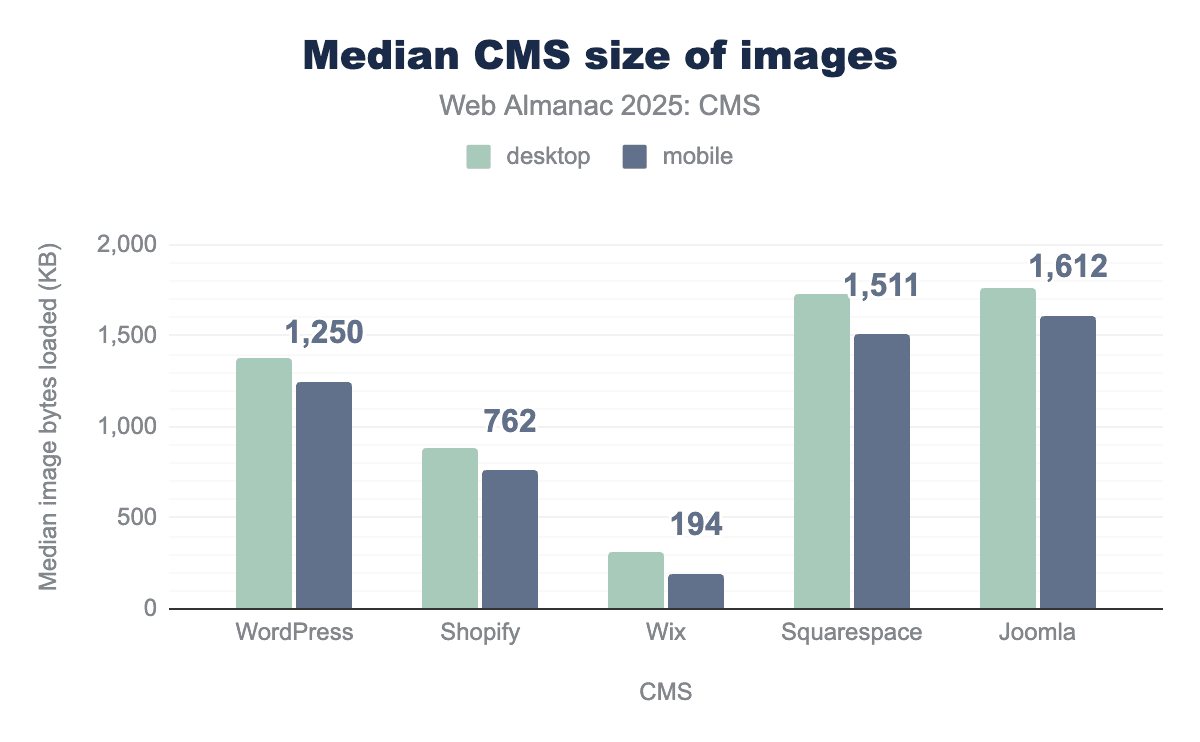
CMS platforms with stronger defaults for image handling generally produce smaller, more consistent image payloads. In more flexible systems, image optimization depends heavily on theme choices, plugin setups, and editorial habits, leading to greater variability.
The continued growth in image payloads helps explain how some platforms can improve loading metrics yet still serve heavier pages overall.
Resource composition: JavaScript
JavaScript is the fastest-growing part of page weight and one of the most important factors for runtime performance. JavaScript payloads reflect the combined cost of core CMS logic, themes, page builders, analytics, ads, and other third-party services.
Page builders and component-based systems often increase JavaScript use by adding client-side rendering and interaction layers. While newer approaches try to load fewer unnecessary scripts, JavaScript remains a major driver of interaction latency and responsiveness issues discussed earlier.
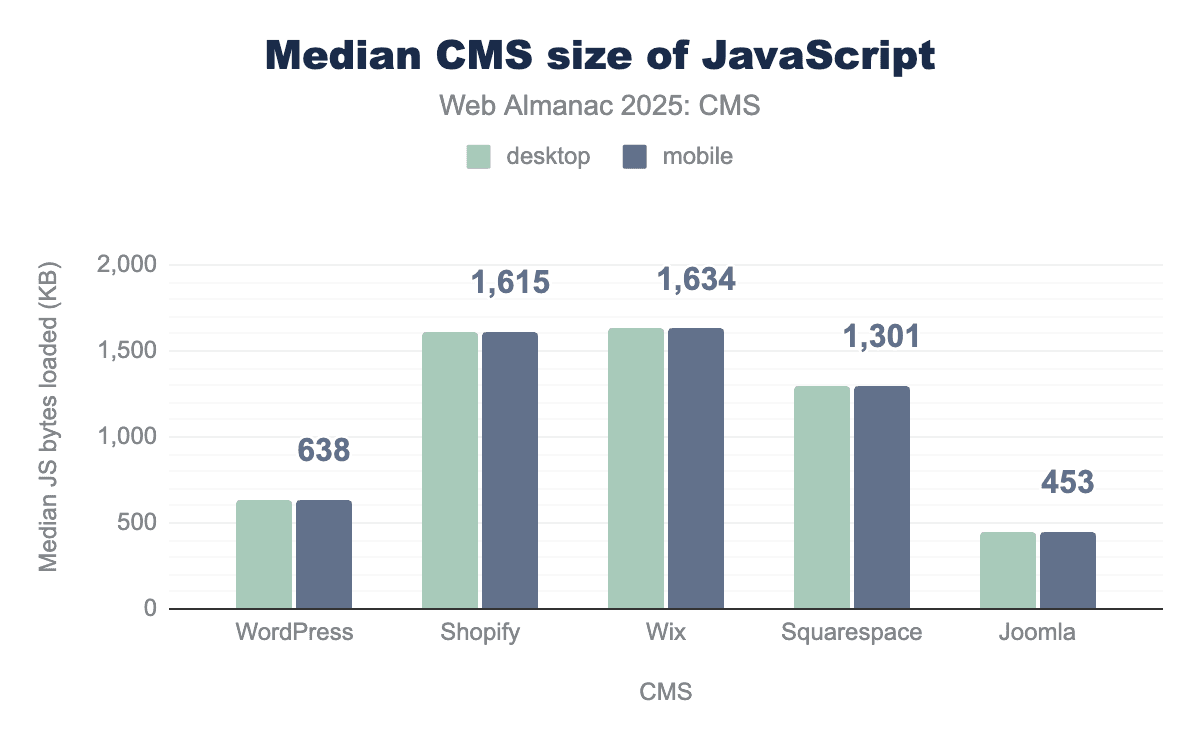
As with overall page weight, JavaScript costs vary significantly within extensible CMS ecosystems. Implementation choices matter more than platform choice alone.
CSS and HTML
CSS and HTML make up a smaller share of total page weight than images and JavaScript, but they still influence rendering. Large global stylesheets, duplicate rules, or unscoped styles can delay rendering and add blocking time.
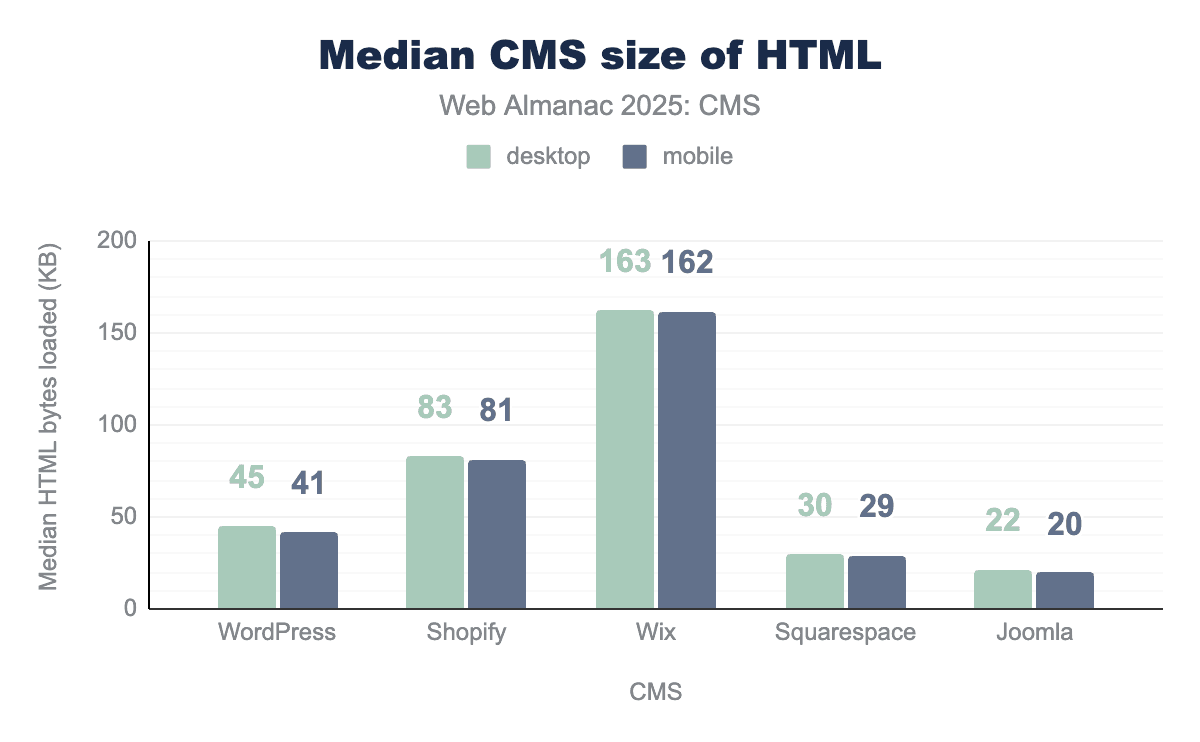

Block-based and component-driven systems increasingly generate CSS dynamically. When caching and reuse are done well, this can reduce unused styles. When handled poorly, it adds complexity and overhead. These trade-offs reflect the broader architectural themes explored earlier in the chapter.
Page weight, performance, and variance
The relationship between page weight and performance is not strictly linear, but it is strong. Heavier pages are more likely to miss Core Web Vitals thresholds, especially on mobile devices where network and CPU limitations magnify inefficiencies.
Across CMSs, page weight acts as a compounding factor rather than a single point of failure. Large image payloads, heavy JavaScript, and globally scoped assets accumulate over time, raising the chances of slow loads, visual instability, and sluggish interactions. Platforms that limit customization tend to reduce this risk through consistent defaults, while extensible systems shift more responsibility onto site owners and implementers.
Overall, page weight reinforces a core idea of this chapter: CMS platforms shape performance indirectly, by influencing how resources are assembled and delivered. As pages grow more complex, managing what goes into them—and how it’s delivered—becomes critical to maintaining reliable performance
Emerging web APIs
As CMS platforms mature, browser capabilities play a bigger role in shaping performance and user experience. New web APIs increasingly offer improvements that work across frameworks and CMSs, shifting some optimization work from servers to the browser itself. These APIs do not remove underlying costs, but they can reduce perceived latency and improve responsiveness when used thoughtfully.
This section highlights browser-level capabilities that are starting to influence navigation speed, interaction responsiveness, and perceived performance across CMS-powered sites.
Speculation Rules API
Navigation latency remains one of the most noticeable sources of slowness on content-heavy, multi-page sites—the kind many CMSs power. The Speculation Rules API addresses this by letting browsers anticipate likely navigations and prepare pages in advance, via prefetching or prerendering.
Unlike traditional preloading, speculation rules allow developers to declare which navigations are likely and under what conditions the browser should act. Early usage shows measurable improvements in navigation performance, including lower First Contentful Paint and Largest Contentful Paint, and smoother page transitions for common browsing paths.
For CMSs, the key value of the Speculation Rules API is that it improves perceived navigation speed without changing backend rendering logic. Because speculative loading happens in the browser, it can reduce the impact of database latency, plugin overhead, or page builder complexity—particularly on sites with predictable navigation flows. The API is currently supported in Chromium-based browsers and safely ignored elsewhere, making it suitable for progressive enhancement.
Long Animation Frames API (LoAF)
While load performance has improved on many CMS platforms, interaction responsiveness is still a consistent pain point. The Long Animation Frames API builds on earlier long-task measurements by tracking delayed animation frames that block visual updates and user feedback. This directly feeds into understanding Interaction to Next Paint (INP).
LoAF shifts attention from individual JavaScript tasks to full-frame delays, making it easier to pinpoint what truly affects responsiveness. By highlighting which scripts, layout operations, or rendering steps most often cause slow frames, LoAF helps teams uncover issues that may not show up in initial page-load tests.
This is particularly relevant on CMS-driven sites, where sluggishness often results from cumulative complexity rather than a single blocking operation. Page builders, analytics, ads, and third-party tools can interact in ways that degrade responsiveness over time. LoAF enables teams to see these patterns in real-user monitoring and understand how interactions perform throughout a session, not just at load.
View Transitions API
The View Transitions API enables smoother visual transitions between page states by allowing the browser to animate content changes. While this is more about visual continuity than raw speed, it can significantly improve perceived performance—especially on content-heavy sites where users navigate frequently.
For CMS platforms, view transitions are important because they narrow the experiential gap between traditional multi-page sites and single-page applications. Combined with techniques like speculative loading, they let server-rendered, CMS-powered sites feel more fluid without adopting complex SPA architectures. Support is still uneven across browsers and usage is early, but initial adoption suggests growing interest in perceived performance improvements.
Priority Hints and Scheduling APIs
As pages become more complex, resource prioritization plays a bigger role in performance. Priority Hints let developers indicate which resources (e.g., images, fonts, scripts) are more important, so browsers can adjust loading order under constrained conditions. When used well, this can improve key rendering milestones without shrinking total page weight.
Similarly, new scheduling APIs provide more control over when main-thread work happens, making it easier to defer less critical tasks in favor of user-visible interactions. On CMS-driven pages with many layers of functionality, these tools help reduce contention during key interaction moments.
Implications for CMS platforms
Together, these APIs signal a broader shift in how web performance improves over time. Instead of relying exclusively on backend changes or CMS-specific optimizations, platforms can increasingly lean on browser intelligence that adapts to user behavior and device capabilities. These APIs do not erase the costs of large payloads or heavy execution.
For CMS ecosystems, this reinforces a familiar pattern: browser APIs can smooth some of the variability introduced by extensibility, but they cannot eliminate core trade-offs between flexibility and predictability. Their impact depends on careful configuration, realistic assumptions about user behavior, and fit with the existing architecture.
As browsers continue to evolve, CMS platforms are likely to adopt these APIs gradually, using them to smooth navigation, improve responsiveness, and reduce perceived latency—without rebuilding their core designs. In that sense, emerging Web APIs act less as disruptive forces and more as multipliers for existing performance strategies.
Artificial Intelligence in CMS
AI capabilities are becoming more common across CMS platforms, but they currently affect content workflows more than core delivery performance. In most cases, AI is used to support how content is created, organized, and enriched, rather than how it is rendered or delivered to users.
Across ecosystems, AI adoption is uneven and mostly optional. AI typically appears as an assistive layer—through plugins, extensions, or external services—rather than as a fundamental change to CMS cores. Common uses include drafting and editing content, summarization, translation, image generation, tagging, and SEO metadata suggestions.
Most AI workflows happen during authoring or on asynchronous backends, so they do not significantly affect page weight, resource composition, or Core Web Vitals. Where AI is used at runtime—for personalization, recommendations, or dynamic content—its impact is more likely to show up indirectly, through additional JavaScript or network requests, depending on implementation.
One area where AI intersects with other CMS trends is editorial scale. By lowering the cost of uploading produced and updated content, and time to distribute to other channels, AI can lead to more pages, richer media, and more dynamic experiences. These shifts can intensify existing performance challenges around page weight, client-side execution, and caching, echoing patterns seen elsewhere in this chapter.
For now, AI in CMS platforms is best understood as a workflow accelerator rather than a performance optimizer. Its effects on user experience are mediated through editorial practices, governance, and implementation discipline—not through direct, measurable gains in loading speed or responsiveness. As AI moves closer to runtime systems, its performance implications may grow, but current evidence suggests its main impact remains operational.
CMS in the era of LLM search
The rise of large language model (LLM)-based search and answer engines is changing how CMS-generated content is evaluated and used. Unlike traditional search engines that focus on ranking pages, LLM systems extract, summarize, and recombine content. This increases the importance of structure, clarity, freshness, and machine-readable signals.
From an HTTP Archive standpoint, these changes show up as greater use of structured data, clearer content hierarchies, and more consistent semantic markup. CMS platforms that promote well-structured HTML, logical heading order, and rich metadata are better positioned for their content to be interpreted and reused accurately by LLM systems.
Indexing behavior also shifts. LLM-based tools tend to favor content that is regularly updated, clearly attributed, and easy to extract. CMSs that support rapid updates and programmatic metadata generation may gain indirect advantages. On the other hand, pages that rely heavily on client-side rendering, large JavaScript bundles, or delayed content hydration may be less visible, as extraction becomes slower or incomplete.
These dynamics align closely with the performance patterns discussed earlier. CMSs that already struggle with JavaScript bloat, slow LCP, or poor INP may face compounding discoverability issues as LLM systems increasingly reward efficiency and clarity. LLM search does not replace traditional indexing, but it amplifies existing trade-offs between flexibility, performance, and content structure.
Structured data evolution
Structured data has become a critical layer between CMS platforms, search engines, and AI-driven consumers. By 2025, it is no longer just a tool for rich snippets or enhanced search results. It increasingly serves as the machine-readable context that governs how content is interpreted, summarized, and surfaced across automated systems.
HTTP Archive data shows steady growth in the use of structured data across CMSs, though implementation quality varies widely. Platforms with native schema support tend to generate more consistent and predictable markup. Those that rely heavily on plugins or custom implementations show greater variability, mirroring broader performance patterns where flexibility often comes at the cost of consistency.
Structured data also interacts with performance and page weight. Poorly implemented schema can inflate HTML size and add DOM complexity without tangible benefits. Well-scoped structured data, by contrast, adds minimal overhead while making content far more interpretable. As CMSs automate more schema generation—often via AI-assisted tools—the risk shifts from not having structured data to having too much of it, where redundant or unnecessary markup adds weight without improving outcomes.
In a world of evolving search and discovery systems, structured data acts as a stabilizing signal. CMS platforms that validate schema, limit redundancy, and integrate structured data into core templates—rather than scattering it across ad hoc plugins—are more likely to produce durable, machine-friendly content. Increasingly, structured data maturity is becoming a differentiator not only for SEO, but for long-term content resilience as automated consumption grows.
Conclusion
The CMS landscape in 2025 reflects a mature, increasingly polarized web. HTTP Archive data shows that CMS platforms now power the vast majority of sites, while non-CMS sites keep shrinking as a share of the web. At the same time, adoption patterns, performance outcomes, and resource usage vary widely according to platform choice, hosting model, and implementation discipline.
Market share data confirms that WordPress is still the dominant CMS, powering more than 60% of CMS-driven sites. Platforms like Shopify continue to grow quickly in specific niches, especially ecommerce, while many other hosted builders show signs of slowing down. Rank-based analysis reveals that these trends are uneven: open-source CMSs remain overrepresented among high-traffic sites, while SaaS builders dominate the long tail of smaller properties. This suggests that CMS selection is increasingly driven by organizational needs and constraints, not just general popularity.
Performance data reinforces this split. Vertically integrated platforms tend to deliver more consistent Core Web Vitals, especially on mobile. Self-hosted CMSs show much wider variance, influenced by themes, plugins, and third-party integrations. Page weight and resource composition data further show that implementation decisions often matter more than platform defaults. Even within a single CMS, sites range from highly optimized to severely bloated, underscoring that performance is an ongoing practice, not a built-in guarantee.
Together, the Core Web Vitals and Lighthouse results highlight a recurring theme: CMS choice influences performance mainly through the constraints, defaults, and tooling it provides. Platforms with more controlled environments tend to produce steadier outcomes. More extensible systems, in turn, allow for both excellent and poor implementations.
These patterns do not point to simple winners and losers. Instead, they reflect trade-offs between flexibility, control, and predictability. As the CMS ecosystem diversifies, outcomes depend less on the logo at the bottom of the site and more on how well each platform’s tools and constraints fit the site’s complexity, the team’s capacity, and long-term maintenance goals.
The rising importance of modern Web APIs, AI-assisted workflows, and LLM-based content consumption adds further pressure. Structured data, semantic markup, and efficient content delivery are no longer nice-to-have optimizations; they increasingly determine whether content is discoverable, interpretable, and performant across both traditional search and new AI interfaces. CMS platforms that promote consistent structure, limit unnecessary complexity, and embrace modern browser capabilities are better positioned to adapt.
Overall, the 2025 CMS ecosystem is defined less by raw growth and more by trade-offs. Flexibility often increases performance variance. Ease of use can produce heavier pages. Automation introduces new governance and quality challenges. CMS platforms will continue to evolve, but the dominant factor in real-world outcomes remains implementation. As the web places greater emphasis on speed, stability, and machine-readable content, CMSs will remain core infrastructure—not because they hide complexity, but because they determine how that complexity shows up at scale.
